
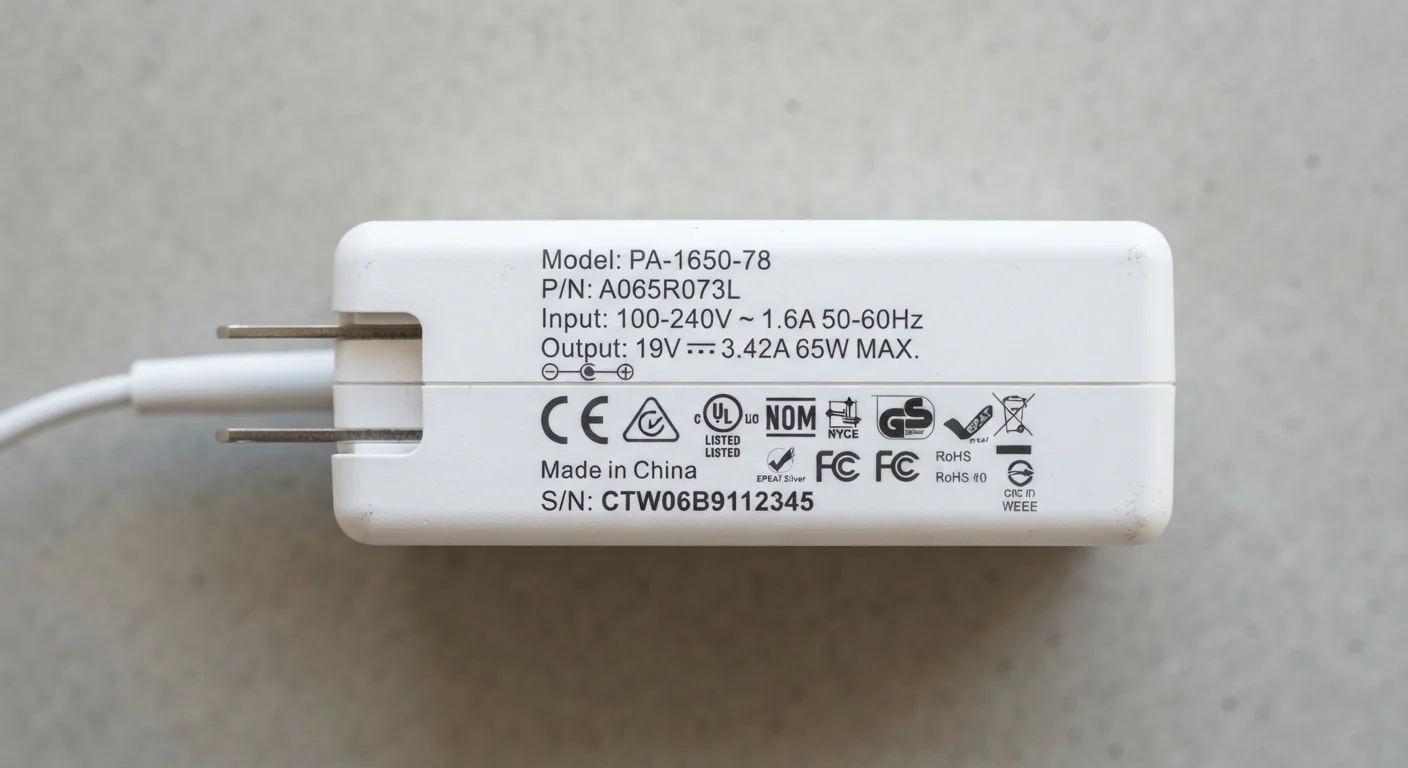
Input vs. Output: Two Different Messages on the Same Label
Flip any power adapter over and you'll find two sets of numbers — INPUT and OUTPUT. They're easy to confuse, but they answer completely different questions.
Input describes what the adapter needs from the wall. In the U.S., standard outlets supply around 120V AC (alternating current). Most modern adapters accept a range — often 100–240V — making them compatible with international outlets. If you travel abroad, the input range tells you whether you need a voltage converter or just a plug adapter.
Output is what actually matters for your device. This is the electricity the adapter sends through the cable — converted to DC (direct current) at a specific voltage and amperage. Your device is designed for a particular output spec, and that's the number you need to pay attention to.
AC vs. DC: What the Abbreviations Mean
Wall outlets supply AC (alternating current), which changes direction rapidly. Devices run on DC (direct current), which flows in one direction. A power adapter's core job is this conversion. The OUTPUT side of any adapter should always be labeled DC, confirming the conversion has happened before power reaches your device.
Volts, Amps, and Watts — What Each One Does
Once you know input from output, the individual units become straightforward.
- Volts (V) measure electrical pressure — how hard the electricity is being pushed. This number must match your device's requirement precisely. An adapter outputting 19V sent to a device expecting 5V can cause serious damage. An adapter outputting 5V sent to a device needing 12V simply won't work.
- Amps (A) measure current — the flow of electricity available. Think of amps as the pipe width. If your device needs up to 2A and your adapter supplies 3A, that's fine: the device draws only what it needs. If your adapter can only supply 1A and the device wants 2A, charging will be slow or unreliable.
- Watts (W) are the product of volts times amps and represent total power output. A 5V / 2A adapter delivers 10W. Wattage is the most direct indicator of charging speed for devices like phones and laptops.
For a broader look at how these terms fit into the wider world of electronics specs, see our plain-English electronics glossary.
5V
Standard USB charging output voltage
Most USB-A adapters output 5 volts DC, the baseline established by the USB specification for standard charging.
100W+
Maximum USB Power Delivery wattage
The USB Power Delivery standard can support up to 240W in its latest revision, enabling laptop-level charging over a single USB-C cable.
100–240V
Input range on most universal adapters
Many modern chargers accept this full global voltage range, making them compatible with outlets in North America, Europe, Asia, and beyond.
Why Matching Numbers Actually Matters
Voltage is non-negotiable. Modern devices include protection circuits, but they have limits. Overvoltage can bypass those protections, generating heat, damaging batteries, or in extreme cases creating a fire risk. Undervoltage is less dangerous but renders the adapter useless for the task.
Amperage is more forgiving in one direction. Higher amp capacity than needed is generally harmless because the device self-limits its draw. Lower amp capacity means the adapter may overheat trying to keep up — a scenario worth avoiding with older or uncertified adapters.
Wattage mismatches are most noticeable with laptops. A laptop rated for a 65W adapter connected to a 30W adapter may charge very slowly, only charge when powered off, or drain the battery even while plugged in under load.
Keep Your Original Adapter When Possible
The adapter that ships with a device is matched to its specific power requirements. Before substituting a spare or third-party adapter, photograph or note down the output specs printed on the original. This gives you a clear reference for any replacement and reduces guesswork.
If you're also sorting out which cable goes with which port, our breakdown of USB connector types covers how cable choice intersects with charging performance.
Reading the Label in Practice
Here's a simple approach for checking any adapter before you use it:
- Find your device's required input — usually printed on the device itself, on a sticker near the charging port, or in the manual. Look for something like "DC 5V / 2A" or "19V 3.42A."
- Check the adapter's OUTPUT label and confirm voltage matches exactly.
- Confirm the adapter's amperage is equal to or greater than the device's requirement.
- Calculate or confirm wattage if charging speed matters to you.
The same logic applies when you're reading specs on any consumer product. Just as bedding labels encode quality in thread count and fill power — decoded in our guide to what bedding labels actually mean — adapter labels encode safety and performance in these three units. Learning to read them takes about 60 seconds and can save your hardware.
This article provides general educational information about consumer electronics and is not a substitute for guidance from a qualified technician for specific device or safety concerns.