
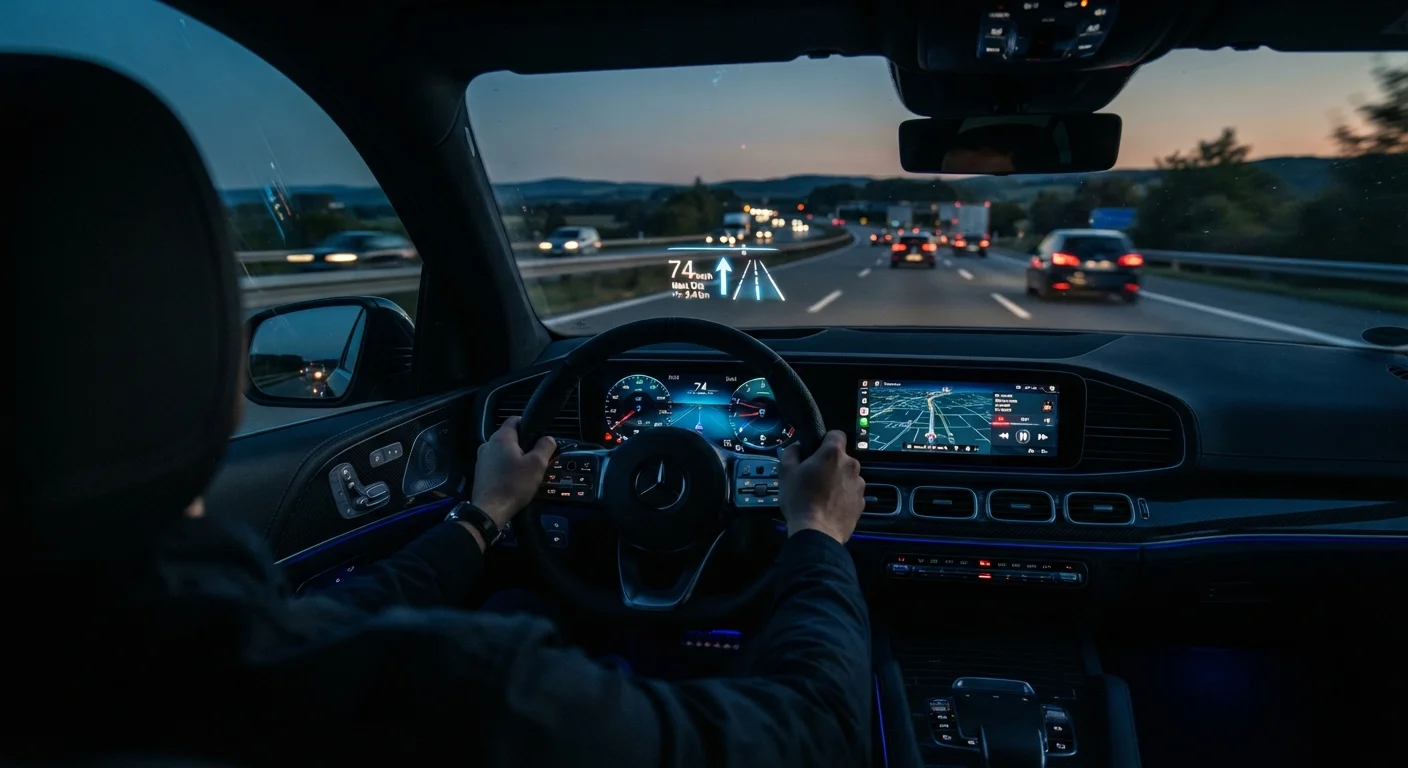
How a HUD Projects an Image You Can Read While Driving
The core challenge a head-up display solves is optical: how do you make a small projected image appear readable at a comfortable viewing distance without the driver refocusing their eyes? The answer lies in virtual image distance - the projected data is optically engineered to appear roughly 6 to 10 feet ahead of the driver, roughly at the same focal plane as the road. The driver's eyes don't need to refocus when glancing at the display, which is the primary safety benefit over a traditional instrument cluster.
Inside a windshield-projected HUD, a small display unit - often an LCD or DLP (digital light processing) element - shines an image upward through a series of mirrors and lenses. That light path bounces off the windshield's inner surface and reaches the driver's eyes. Because the windshield is angled, the reflected image appears to float above the hood.
Factory systems use a special wedge-shaped laminate built into the windshield glass itself. This wedge eliminates the "ghost image" problem where both the inner and outer glass surfaces produce separate reflections. If you've ever seen a faint double image on an aftermarket HUD, that's the same effect - those units sit on standard glass not designed for projection.
Windshield Glass and HUD Compatibility
If you replace a factory-equipped HUD windshield with a standard aftermarket glass, the ghost-image problem will likely return because the replacement won't have the wedge laminate layer. Always specify HUD-compatible glass when replacing the windshield on a vehicle equipped with a factory head-up display. Your insurer or glass provider can confirm the correct part specification.
Combiner HUDs vs. Windshield HUDs: What's the Difference?
Not all HUDs project onto the windshield. Combiner HUDs use a small, transparent panel that folds up from the dashboard top. The projector shines onto this panel rather than the glass itself. Combiners are thinner and cheaper to manufacture, which is why many mid-range vehicles and most aftermarket units use them.
Windshield-projected HUDs require the automaker to design the glass laminate and dashboard projection path together - a more expensive engineering commitment but one that generally produces a larger, more legible display area. Luxury and performance vehicles have led adoption here, though the technology is spreading to mainstream segments.
Augmented reality HUDs represent the next step. These systems use forward-facing cameras and sensor data to overlay directional arrows or lane boundaries directly onto the driver's perceived view of the road - so a navigation arrow appears to sit on the actual pavement ahead rather than floating abstractly in the air. This is closely related to the broader driver-assist ecosystem; see our overview of ADAS technologies for context on how these systems interconnect.
~2 sec
Average eyes-off-road time when reading a traditional gauge
Studies from traffic safety researchers suggest a driver traveling at highway speed covers significant ground during each glance away from the road - a key motivation for HUD development.
6-10 ft
Typical virtual image projection distance in factory HUDs
Automakers calibrate this distance so the HUD image sits at roughly the same focal plane as nearby road features, minimizing refocus time for the driver's eyes.
3x
Growth rate of AR-HUD adoption in new vehicle programs
Industry analysts tracking automotive display technology note augmented reality HUD integration is accelerating across mainstream and premium vehicle segments alike.
Why Placement and Height Adjustment Matter
Even a technically excellent HUD becomes a problem if it's positioned poorly relative to the driver's eye level. Most factory systems include a height adjustment - typically a few degrees of vertical tilt - so drivers of different heights can center the display in their natural forward gaze. If the image sits too low, a short driver sees it clipped by the dashboard; if it's too high, a tall driver must look up unnaturally.
The horizontal position matters too. Manufacturers generally center the image in front of the driver rather than the vehicle centerline. This prevents the display from overlapping areas of visual importance - like an approaching intersection - and keeps it in peripheral view rather than competing with the focal point of the road ahead.
Contrast and brightness are equally critical. A HUD that looks vivid in a dim garage can wash out completely under bright midday sun. Quality systems use automatic brightness sensors to ramp up luminance in direct sunlight and reduce it at night to avoid blinding the driver. This is one area where factory units typically outperform aftermarket options, which often require manual brightness adjustment.
Set HUD Height Before Your First Long Drive
Spend a few minutes adjusting your HUD's vertical position while stationary in a safe area, then confirm the image sits comfortably in your forward gaze at normal driving posture. Small misalignments that seem minor in a parking lot become fatiguing on a long highway drive. Most factory systems allow adjustment through the vehicle's infotainment settings menu.
Aftermarket HUDs and Their Limitations
Plug-in aftermarket HUDs connect to a vehicle's OBD-II diagnostic port to pull real-time speed and RPM data, then display it on a combiner screen that adheres to the dashboard top. For drivers who want basic speed readout in their line of sight, these units can be a practical solution. However, they have meaningful limitations worth understanding before purchasing.
First, OBD-II data has a slight refresh lag compared to native instrument cluster feeds. Second, aftermarket units generally cannot sync with a vehicle's navigation system, so turn-by-turn directions won't appear unless the unit has its own GPS receiver. Third, the combiner panel adds a physical object to the dashboard that can obstruct sightlines or interfere with defrost vents if positioned incorrectly.
If you're also considering other display upgrades for your vehicle, our guide on adding an aftermarket screen covers compatibility and installation considerations worth reviewing first.
It's also worth distinguishing a HUD from dashboard warning systems. A HUD supplements information - it doesn't replace the instrument cluster or the warning light system. Understanding what dashboard warning lights mean remains essential regardless of what display technology you have overlaid on your windshield.